Harmony Palette
A downloadable tool
Harmony Palette for Aseprite 1.3.x
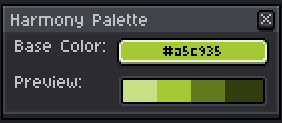
A simple, modeless script that helps you generate a harmonious HSL‑based palette on the fly. Once installed, just run Harmony Palette from File > Scripts, pick any base color, and instantly see four matching luminosity steps (70%, 50%, 30% and 15%) displayed below.
How it works:
-
Base Color: Opens a color‑picker to choose your starting hue and saturation.
-
Live Preview: Four swatches update in real time to show lighter and darker variants of your chosen color.
-
Click‑to‑Paint: Left‑click a swatch to set it as your foreground color, right‑click to set it as the background—no need to close the window.
---------------------------------------------------------------------------------------------Version 1.2 - What's New
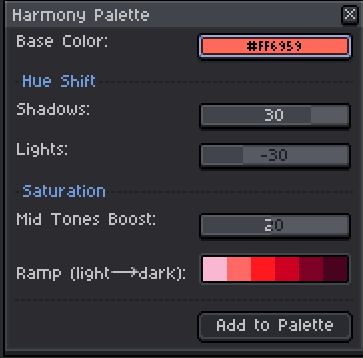
Adaptive Saturation System: The new version intelligently adjusts color saturation based on luminosity to prevent oversaturated "neon" colors in light tones and overly muted grays in dark tones. This results in more natural and harmonious palettes across different color ranges.
Manual Saturation Control: Added a slider (-50 to +50) that lets you fine-tune the saturation adjustment to match your personal taste or specific project needs.
Extended Palette: Increased from 4 to 6 luminosity steps (0.80, 0.65, 0.50, 0.35, 0.20, 0.10) for greater tonal variety.
The original version (1.0) remains available for users who prefer the simpler, formula-based approach without automatic adjustments.
---------------------------------------------------------------------------------------------Version 1.3 & 1.4 - What's New
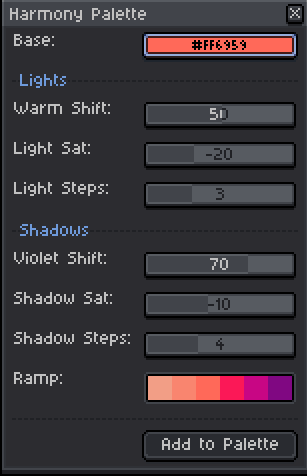
I'm uploading both versions because I really don't know which one is better. From version 1.2 onwards, they are quite functional, but the higher the version, the more customizable options there are. I'm uploading both so you can choose the one that best suits your work =D
Download
Click download now to get access to the following files:

Comments
Log in with itch.io to leave a comment.
What updates have there been to this? I don't see any notes but I was curious.
There haven't been any updates yet. It's just a small script I made for my own work. If you think the script needs anything added, it would help me to know so I can implement it.
Ohh, it said it was updated 23 days ago in the details. The only thing I've found when using it is that the suggestions can be hit or miss. For example, if I have a dark green and I use the tool, it shows a much lighter super saturated green (like neon). I've programmed in LUA, not sure how you'd even account for that though. Some colors just need to have sat adjusted or they become muted, or overpowered. It works great 80% of the time though!
Ah! I think I changed something in the description on ith.io, but I didn't touch the code. As for obtaining colors, it follows a fixed formula (it's a pretty small and simple script). ColorCalc follows a reference formula (which makes it more open, but less “practical” precisely because it needs that reference). As you can see, I've tried to address the issue of color in some scripts, but the good thing (and what makes it very difficult) is that there are no correct colors, only personal tastes.
I've tried to tweak the script a little. I hope it helps. =D
How can I contact you? Email? :D
Instagram? @heos.pixel