Heos ColorVariation
A downloadable tool
Heos Color Variations paints subtle, natural color variation onto any layer—without touching your original pixels. Pick a base color, set how many tints you want and how much they spread in brightness, saturation, and hue, and hit Allons-y!. The result lands on a dedicated Color Variations layer so your source stays untouched and you can regenerate as many times as you like.
Designed for the kind of work where pure flat color looks too clean: dungeon walls, stone floors, brick textures, organic shapes, bark, soil, foliage—anything that should look hand-varied but you don't want to paint cell by cell.
Main Features:
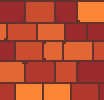
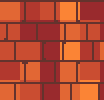
- Per-region mode (default) – Each connected blob of the base color gets one single random tint. Paint a wall of fifty bricks and every brick comes out a slightly different shade, exactly like real masonry. Fully automatic — no manual selection per shape.
- Grain and patch modes – Turn per-region off and choose a size: size 1 gives per-pixel noise, larger values give square patches of uniform color. Good for organic textures, rocky surfaces, or ground tiles.
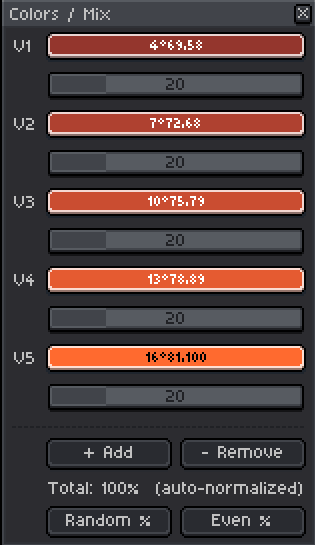
- Up to 12 color variants – A secondary Colors / Mix… window lets you inspect and tweak every tint individually, reassign percentages (how often each color appears), randomise them, or level them. Keep it open while you paint in Aseprite — it's non-blocking.
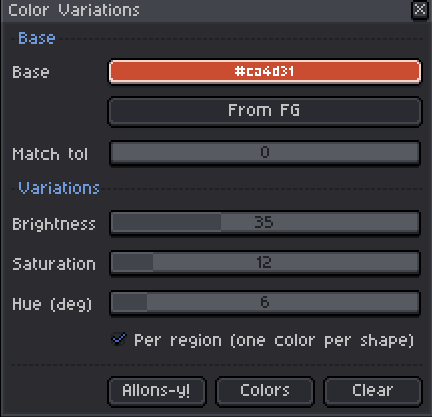
- HSV spread controls – Three sliders (Brightness, Saturation, Hue) spread the variants around your base color automatically. Start from there and refine by hand, or dial in the spread and let it generate.
- Color matching with tolerance – Matches the base color exactly or within a configurable tolerance, so it works even on slightly anti-aliased or dithered surfaces.
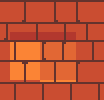
- Honors the active selection – Restrict variation to any region you've selected; the rest of the layer is untouched.
- Non-destructive – All output goes to the Color Variations layer (created automatically). Hit Clear to remove it instantly; your original is never modified.
- Works in RGB, Grayscale and Indexed – Indexed mode maps each variant to the nearest palette entry.
- Regenerates every run – Every Allons-y! produces a fresh random pattern on the same layer. Iterate until you like it.
How to Use (step by step):
- Install – File > Scripts > Open Scripts Folder, drop
Heos_ColorVariations.luainside, then File > Scripts > Rescan. Run it from the Scripts menu. - Pick the base color – Use the Base color picker or click From FG to grab the current foreground color. Raise Match tol if your surface has slight color variation you still want to treat as one region.
- Set the spread – Adjust Brightness, Saturation and Hue sliders. The Colors / Mix… preview updates live as you drag. Open Colors / Mix… for detailed per-tint control.
- Choose a distribution mode – Leave Per region on for bricks/blobs (one color per shape). Turn it off and set Size for grain or patches.
- Generate – Click Allons-y!. Keep clicking until the random pattern looks right — each run is fresh.
- Refine – Tweak spread or individual tints in Colors / Mix… and generate again. When done, merge the Variations layer down or keep it separate for later adjustments.
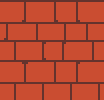
Exemples:
Original:
Per region:
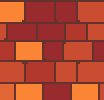
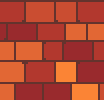
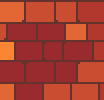
without region (and selection the last one):
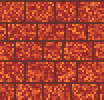
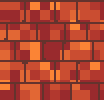
Tips:
- The script targets the active layer as the source. If the Color Variations layer is active, it automatically uses the layer below — so you can safely leave it selected and keep hitting Allons-y! to re-roll.
- Use the active selection to vary only part of a layer — great for adding a weather stain, a shadow zone, or a lit patch to an otherwise uniform surface.
- In the Colors / Mix… window, Random % shakes up the distribution weights for more organic-looking variation; Even % resets them to equal shares.
- Works great in combination with your tile or background workflow: run it on your wall layer, then flatten only when you're happy.
💬 Feedback & Support
I love seeing how you use Autometric in your projects. If you have questions, ideas, or just want to share what you’ve made, feel free to leave a comment or reach out directly. It’s always great to see your work in action.

If you found this tool useful, taking a moment to leave a rating really helps. Thanks for the support. ❤️
Purchase
In order to download this tool you must purchase it at or above the minimum price of $2.99 USD. You will get access to the following files:
Leave a comment
Log in with itch.io to leave a comment.