Heos Gradient Map
A downloadable tool
Heos Gradient Map
Heos Gradient Map is a non-destructive gradient mapping tool designed specifically for Aseprite 1.3.x. This script allows you to transform the lighting, atmosphere, and color palette of your sprites by applying custom color ramps, active indexed palettes, or advanced dithering shading effects in real time.
It provides a useful workflow for sketching quick color variations, applying stylized shading, or rendering complex lighting setups for animations directly inside Aseprite.
Original idea inspired by Kam.
Main Features:
- Non-destructive workflow: The script automatically creates or updates a dedicated layer named Gradient Map at the top of the timeline. Your original artwork layers and pixel data remain completely untouched.
- Layer groups support: The script analyzes the full document structure and recursively searches inside nested layer groups to compile and map all visible graphic elements.
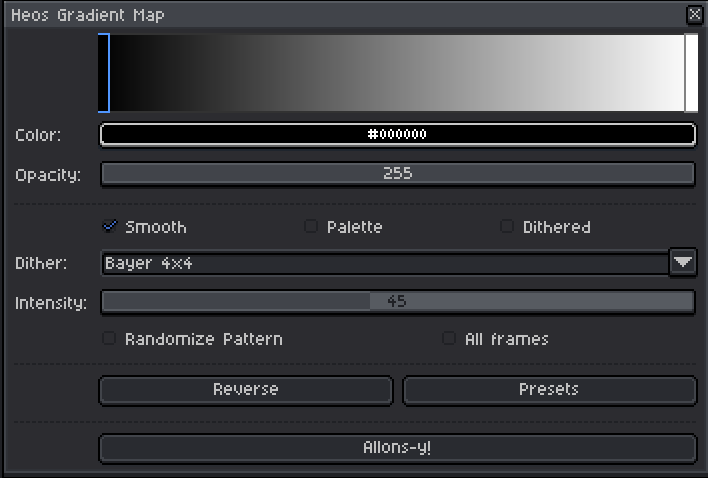
- Dynamic live previews: Changes to colors, handler positions, and numerical values update the gradient bar immediately to show the exact behavior of the color ramp.
- Palette mode: Allows you to import colors from the active Aseprite palette directly into the gradient bar with a single button, ensuring strict color consistency.
- Advanced dithering tools: Includes classic digital patterns such as Bayer 2x2, Bayer 4x4, Bayer 8x8, and Lines, which facilitate retro texture creation and smooth value transitions within limited palettes.
- Dither intensity control: A slider allows you to dynamically regulate the blending strength of the dither pattern from 0% to 100% to achieve the desired balance.
- Pattern randomization: A checkbox breaks the mathematical rigidity of the dithering grids to provide a more organic finish.
- Batch animation processing: Offers the choice to apply the gradient map exclusively to the current frame or process the entire animation timeline simultaneously.
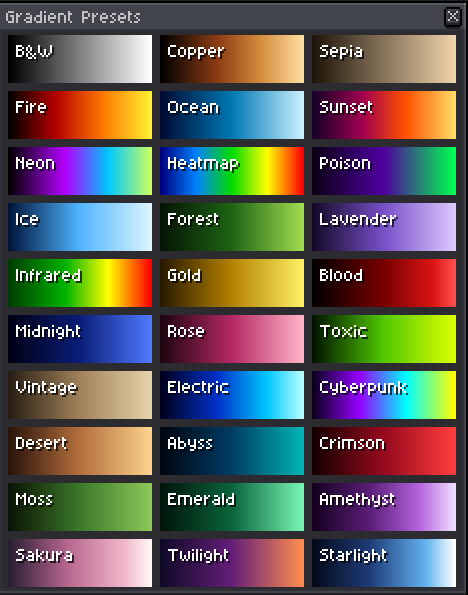
- Thirty built-in presets: Provides instant styling through a curated collection of thirty factory presets, including Fire, Cyberpunk, Neon, Sepia, Gold, Midnight, Sunset, and Toxic.
Color Stops Control in the User Interface:
Managing colors on the gradient bar is completely interactive through the following control commands:
- To add a new color stop, perform a left-click on any empty space along the gradient bar. This action creates a new handler that automatically copies the color at that exact position.
- To move a color stop, simply left-click and drag the handler to the left or right to change its distribution within the gradient sequence.
- To change the color and opacity, left-click on the handler you wish to modify, which allows you to adjust its properties using the color picker and the lower opacity slider. The bar features a checkered background to facilitate the visualization of transparencias.
- To remove a color stop, right-click directly on the handler you want to delete. The script requires a minimum of two active points to function properly.
- To invert the gradient, press the Reverse button, which will mirror the entire color sequence symmetrically.
Examples:





💬 Feedback & Support
I love seeing how you use Heos Gradient Map in your projects. If you have questions, ideas, or just want to share what you’ve made, feel free to leave a comment or reach out directly. It’s always great to see your work in action.

If you found this tool useful, taking a moment to leave a rating really helps. Thanks for the support ❤️
Download
Click download now to get access to the following files:
Leave a comment
Log in with itch.io to leave a comment.