Heos.Pixel Render 3D — Auto Voxel
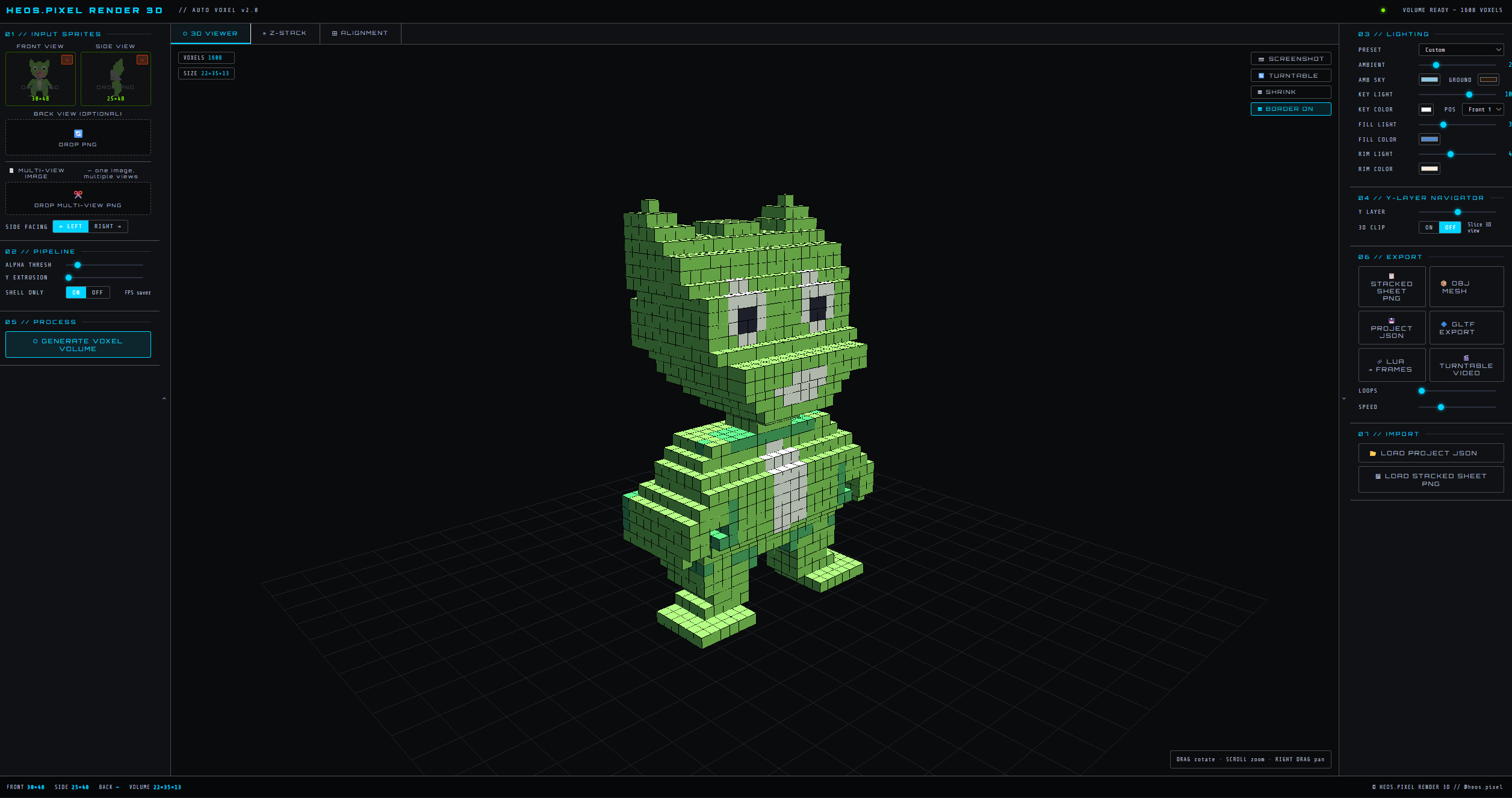
Heos.Pixel Render 3D is an automatic voxelization engine built for pixel artists and indie game developers. Upload your Front and Side views (and optionally a Back view) and watch as the algorithm instantly generates a coherent 3D volume that respects the exact silhouette and color palette of your original sprite.
Forget manually sculpting block by block. The "Auto Voxel" pipeline analyzes 2D projections, calculates depth through intersection, and fills the volume using intelligent color logic that prioritizes the front and side faces. The result is a 3D model faithful to your original design, ready for game engines, 3D pixel art scenes, or renders.
Key Features
- 🖼️ Smart Sprite Loading: PNG transparency support. Automatic background color detection for sprites without an alpha channel.
- ⊞ Interactive Alignment Editor: Visually adjust the position, scale, and cropping of Front and Side views. Drag bounding box edges or use sliders for perfect height matching.
- ⬡ Real-time 3D Viewer:
- Smooth orbital navigation (Rotate / Zoom / Pan).
- Auto Turntable mode.
- Y-Layer clipping to inspect the model's internal structure.
- 🎨 Professional Voxel Pipeline:
- Alpha Threshold: Control semi-transparent pixel sensitivity.
- Y Extrusion: Add thickness or height to your model (great for forced perspective characters).
- Shell Only Mode: Automatically removes interior voxels to save polygons and boost performance (FPS saver).
- 💡 Dynamic Lighting System: Modify the 3D scene in real-time. Includes presets (Studio, Sunset, Neon, Dramatic) and full control over Key, Fill, Rim, and Ambient (HDR) lights.
- 📦 Multi-View Import: Got a single sprite sheet with all views? Select regions (Front/Side/Back) and the tool crops them automatically.
Free Web Demo vs. Full Version (Paywall)
This page hosts the Free Web Demo. You can test all modeling and visualization features directly in your browser without installing anything.
🔒 Free Demo Limitations:
- Exports are DISABLED. You cannot download OBJ, GLTF, PNG Sheets, Project JSON, or Video files.
- Perfect for testing if your sprite works well with the voxelization algorithm before purchasing.
🔓 Unlock Full Version (Available on this page): Purchase the full version to remove the paywall and unlock ALL EXPORTS:
- OBJ (with MTL materials)
- GLTF (ready for Blender/Godot/Unity)
- Project JSON (save/load your work)
- Stacked PNG Sheet (all Y layers in one image)
- LUA Script (import directly into Aseprite)
- Turntable Video (transparent background WebM)
Controls & Quick Start
- Step 1: Drag your Front sprite to the blue dropzone and your Side sprite to the orange dropzone.
- Step 2: Switch to the "⊞ ALIGNMENT" tab. Adjust the bounding boxes so the head and feet align perfectly in height across both views.
- Step 3: Click "⬡ GENERATE VOXEL VOLUME".
- Step 4: Explore your model in the "3D VIEWER" tab or slice through layers in "Z-STACK".
💬 Feedback & Support
I love seeing how you use Heospixel Render 3D in your projects. If you have questions, ideas, or just want to share what you’ve made, feel free to leave a comment or reach out directly. It’s always great to see your work in action.

If you found this tool useful, taking a moment to leave a rating really helps. Thanks for the support ❤️
Purchase
In order to download this tool you must purchase it at or above the minimum price of $3.99 USD. You will get access to the following files:
Leave a comment
Log in with itch.io to leave a comment.