Heos Perspective
A downloadable tool
Heos · Perspective
Heos Perspective is a non‑destructive perspective warping tool for Aseprite 1.3.x. It lets you freely distort any selected area using four independent corner handles, edge‑based tilting, and mirroring – all in real time with an interactive preview. Perfect for creating isometric tiles, mockups, floor reflections, or any angled transformation inside Aseprite.
Note: This script is a derivative of Autometric – This tool offers more flexibility, but that makes it less user-friendly. If you want something more automated, check out Autometric =D
Unlike basic skew or rotation, Heos Perspective gives you full 4‑point warping (like a free‑transform corner pin) plus additional edge parameters to tilt the top/bottom edges and scale the left/right sides. The result is a clean, pixel‑accurate image that you can apply to the current canvas or export to a brand new sprite.
Main Features:
- 4‑corner free transform – Independently move top‑left, top‑right, bottom‑left and bottom‑right corners (in X or Y axis) to create any trapezoid, perspective, or irregular shape.
- Edge tilt & scale – Separate sliders for Top tilt, Bottom tilt, Left scale and Right scale – perfect for quickly adding lean or compression without touching individual corners.
- Mirror mode – When enabled, the right‑side corners (TR / BR) automatically mirror their values to the left side (TL / BL). Ideal for symmetrical warps like book pages, screens, or reflections.
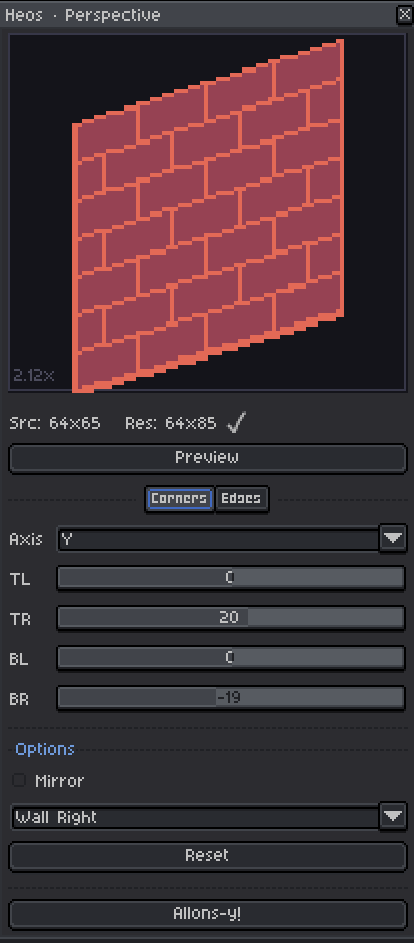
- Live preview canvas – A dedicated 200×180 preview area shows your warped result in real time, with a scale badge indicating the applied zoom factor.
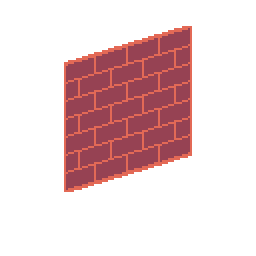
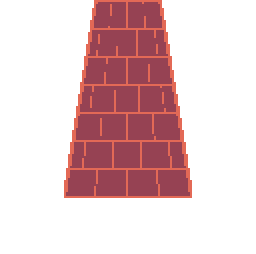
- Built‑in presets – One‑click setups: Wall Right, Wall Left, Floor, Ceiling. Great for quick architectural or environmental distortions.
- Smart canvas handling – If the warped result doesn’t fit, the script offers to expand the current canvas, create a new sprite (with margin), or apply anyway with clipping.
- Non‑destructive application – The transformed image is placed on a new layer (named “Heos · Perspective”), leaving your original artwork untouched.
- Works from selection – Just make a rectangular selection on any RGB layer, click “Preview”, and start warping. The script automatically crops the selected area.
- Pixel‑accurate warping – Uses an inverse UV mapping algorithm with sub‑pixel sampling, preserving transparency and only drawing opaque pixels.
How to Use (step by step):
- Make a selection – In Aseprite, select the rectangular area you want to warp. It can be on any visible layer (the sprite must be RGB mode). Adjust the selection carefully to avoid empty spaces.
- Launch the script – Run
Heos_Perspective.luafrom the File > Scripts menu. - Click “Preview” – The script grabs your selection and displays it in the preview canvas. The source resolution is shown at the bottom.
- Adjust the warp – Use the Corners tab to move each corner (switch between X/Y axis with the combo box). Use the Edges tab to tilt or scale whole sides. Enable Mirror for symmetrical distortion. Apply a preset or hit Reset to start over.
- Check the preview – The canvas updates whenever you release a slider. The result size is shown next to the source size.
- Apply the warp – Click Allons‑y! If the warped image fits inside the canvas, it is pasted on a new layer. If it doesn’t fit, you’ll be asked to expand the canvas, create a new sprite, or apply anyway.
User Interface – Key Controls:
- Preview button – Loads the current selection into the script.
- Corners tab + Axis selector – Four sliders (TL, TR, BL, BR) that move the selected corner either horizontally (X) or vertically (Y).
- Edges tab – Top tilt / Bottom tilt (rotate the top or bottom edge), Left scale / Right scale (compress or stretch the left or right side).
- Mirror checkbox – Locks TL and BL to the mirrored values of TR and BR.
- Preset dropdown – Instantly apply one of four geometric distortions.
- Reset button – Zeroes all corner and edge sliders.
- Allons‑y! button – Applies the warp to the sprite.
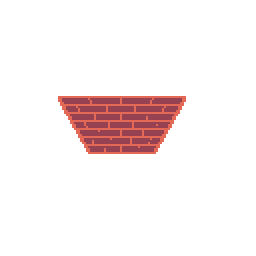
Examples:
A simple wall:
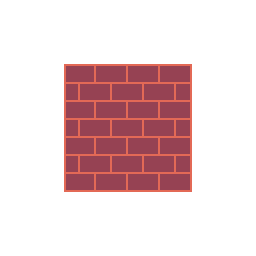
Result with presets:
💬 Feedback & Support
Heos Perspective is part of the Heos toolset for Aseprite. If you use it in your pixel art, game assets, or mockups, I’d love to see what you create. Feel free to leave a comment, report issues, or share your work. Your feedback helps improve the tool.

If you find this script useful, a rating is greatly appreciated. Thank you for your support ❤️
Download
Click download now to get access to the following files:
Leave a comment
Log in with itch.io to leave a comment.